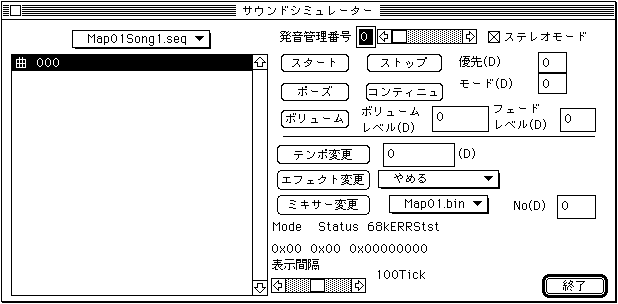
If the sequence bank has been transferred to the currently active current map, you can select the sequence bank from the pull-down menu above the file list box. When you select a sequence bank, the sequence names included in the bank are listed as shown above. Select the sequence you want to pronounce here and use the buttons below to control the pronunciation.
Pronunciation control number
Set the pronunciation control number. The setting range is 0 → 7.
Stereo mode
Switch between stereo and mono modes. It is invalid for mono songs.
start
Start pronunciation.
stop
Stops pronunciation.
priority
Specifies the pronunciation priority of the sequence. From 0 to 127, 0 is the highest priority.
Pause
Pauses pronunciation.
Continue
It will restart from a pause.
mode
Various modes can be set. For details, refer to the SATARN Sound Driver manual.
volume
Sets the volume level of the sequence and the speed of Fade in (out).
Volume level
Set the volume. From 0 to 127, 127 is the maximum volume. Used in combination with Fade Level.
Fade level
Specify the Fade Level of Fade In / Fade Out. From 0 to 255, it changes most slowly at 255.
Tempo change
Change the playing tempo. Specify the tempo value you want to change. Positive values are fast and negative values are slow. -32768 → +32767, which is 4096, which is double (half when minus).
Effect change
Switch the DSP program. You can select from the pull-down menu.
Mixer change
Switch the Mixer. You can select from the pull-down menu.
No
Set the Mixer Number. 0 → 127
Mode 0x00
Shows what the Sound Driver is currently doing.
Status 0x00
Shows the current state of the Sound Driver.
68kERRStst 0x00000000
Refer to the 68000 status bits of the sound driver to display the contents.
Display interval
Mode Sets the interrupt interval for Status. From 8Tick to 200Tick is 1Tick 1/60 second.
end
Exit Sound Simuration and close the window.
For details on the contents of each control command, refer to "Sound Driver Programmer's Guide / Sound Control Command Details ".