 ★ SOUND Manual ★ Sound Simulator Manual
▲ Back | Forward ▼
Sound simulator manual
PCM stream playback
- If you select this, the following dialog will be displayed.
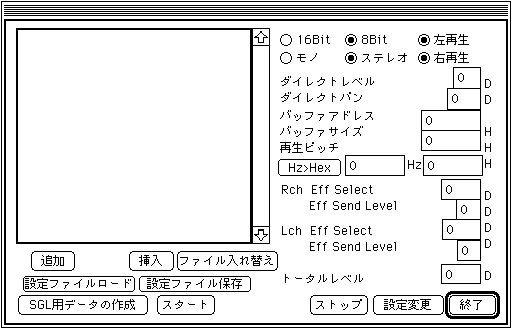
- Add / Insert
- Enter a new file for PCM stream playback. AIFF file and BIN file can be selected as the file.
- File replacement
- Change only the file without changing the settings such as [Direct Level] and [Direct Pan] assigned to the file.
- Load configuration file and save configuration file
- Saves the full path of the file you entered and the settings assigned to that file in a save file.
- Creating data for SGL
- Creates pure PCM data without headers.
- start
- Start PCM Stream Play according to your settings.
- stop
- Stops PCM stream playback.
- setting change
- Change the settings of the PCM data currently being played. Valid parameters for changing settings are [Direct Level], [Direct Pan], [Playback Pitch], [Left / Right Eff Select], and [Left / Right Eff Send level].
- Hz> Hex
- It calculates from the frequency to mixed data of OCT and FNS (format that the target can recognize).
- end
- Exit PCM Stream Play mode and close the dialog.
About various parameters
- ○ 16 Bit ○ 8 Bit
- Select whether the PCM data to be played is 16it or 8Bit.
- ○ Mono ○ Stereo
- Select whether the PCM data to be played is monaural or stereo.
- ○ Left play ○ Right play
- It is valid only for stereo files and plays only the right channel or the left channel. (However, since it is managed by the application, the driver, hardware, etc. do not have this function.)
The above three data will be set automatically if the settings are included when the data is read. - Direct level
- Set the volume during playback. The setting value is from 0 to 8.
- Direct bread
- Set the Pan during playback. The setting value is from 0 to 31. Ignored in stereo.
- Buffer address
- This is the start address where the PCM data to be played is stored. From 0 to 0xffff0, the setting value of the 1st place is ignored.
- Buffer size
- Set the buffer of PCM data to be played. The setting value is from 0 to 0xf000 and is set in units of 0x1000. This value indicates the number of samples.
- Playback pitch
- Set the playback pitch. The setting value is 0 → 0xffff.
To set the playback pitch by frequency, set the frequency with the edit text on the left and display the calculation result in the edit text on the right with the [Hz> Hex] button. - Eff Select
- Select the effect for each of the left and right channels. The setting value is from 0-> 15.
- Eff Send Level
- Set the Effect Send Level. The setting value is from 0 to 7. In the case of monaural, these effect relationships are set on the right channel.
- Total level
- Set the total level. You can set the volume more finely than [Direct Level]. The setting width is 0 → 255.
▲ Back | Forward ▼
★ SOUND Manual ★ Sound Simulator Manual
Copyright SEGA ENTERPRISES, LTD., 1997