HARDWARE ManualVDP2 User's Manual
BackForward
VDP2 User's Manual

Chapter 14 Shadow Function


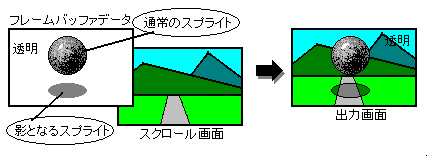
The shadow function is a function that uses a sprite to cast a shadow on the sprite itself or the scroll screen. There are two types of shadow sprites, normal shadows and MSB shadows, depending on the data. MSB shadows are only available when the sprite type is type 2-7. The shadow feature is only used when the shadow sprite has the highest priority.

The shadow function is processed after the color calculation function and the color offset function. The shadow function is shown in Figure 14.1.

Figure 14.1 Shadow function

■ 14.1 Shadow processing

Shadow processing forcibly makes the sprite transparent when the sprite of the normal shadow or MSB shadow has the highest priority, and the brightness of the part where the sprite was in the top image determined on the screen excluding the sprite. Is to halve.

● Normal shadow

In a normal shadow sprite, only the least significant bit of the dot color data in the specified sprite type is 0, and all other dot color data is 1, and the number of bits to be judged varies depending on the sprite type.

For the sprite data of the normal shadow, specify a color control word such that all bits of the dot color data excluding the dot color code are 1, and set only the least significant bit to 0 and all the remaining bits to 1. It is created by writing a dot color code sprite character to the framebuffer. At this time, the frame buffer data that has already been written is overwritten, so the sprite cannot be shaded. Therefore, you should usually write to the framebuffer first. See the VDP1 User's Manual for color control words.

The scroll screen and back screen, which are shaded by normal shadow sprites, can be specified for each screen.

The normal shadow is shown in Figure 14.2, and the sprite data of the normal shadow is shown in Figure 14.3.

Figure 14.2 Writing sprite data for normal shadows
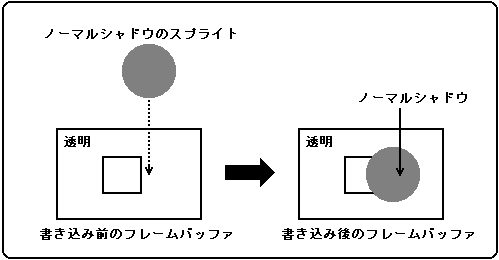
Figure 14.3 Normal shadow sprite data
● For sprite types 0 to 3, 5 Bits 15 8 7 0
┌─┬─┬─┬─┬─┬─┬─┬─┬─┬─┬─┬─┬─┬─┬─┬─┐
│-│-│-│-│-│ 1 │ 1 │ 1 │ 1 │ 1 │ 1 │ 1 │ 1 │ 1 │ 1 │ 0 │
└─┴─┴─┴─┴─┴─┴─┴─┴─┴─┴─┴─┴─┴─┴─┴─┘

● For sprite types 4 and 6, bits 15 8 7 0
┌─┬─┬─┬─┬─┬─┬─┬─┬─┬─┬─┬─┬─┬─┬─┬─┐
│-│-│-│-│-│-│ 1 │ 1 │ 1 │ 1 │ 1 │ 1 │ 1 │ 1 │ 1 │ 0 │
└─┴─┴─┴─┴─┴─┴─┴─┴─┴─┴─┴─┴─┴─┴─┴─┘

● For sprite type 7 Bits 15 8 7 0
┌─┬─┬─┬─┬─┬─┬─┬─┬─┬─┬─┬─┬─┬─┬─┬─┐
│ − │ − │ − │ − │ − │ − │ − │ 1 │ 1 │ 1 │ 1 │ 1 │ 1 │ 1 │ 1 │ 0 │
└─┴─┴─┴─┴─┴─┴─┴─┴─┴─┴─┴─┴─┴─┴─┴─┘

● For sprite types C to F Bits 15 8 7 0
┌─┬─┬─┬─┬─┬─┬─┬─┬─┬─┬─┬─┬─┬─┬─┬─┐
│ − │ − │ − │ − │ − │ − │ − │ − │ 1 │ 1 │ 1 │ 1 │ 1 │ 1 │ 1 │ 0 │
└─┴─┴─┴─┴─┴─┴─┴─┴─┴─┴─┴─┴─┴─┴─┴─┘

● For sprite type 8 Bits 15 8 7 0
┌─┬─┬─┬─┬─┬─┬─┬─┬─┬─┬─┬─┬─┬─┬─┬─┐
│ − │ − │ − │ − │ − │ − │ − │ − │ − │ 1 │ 1 │ 1 │ 1 │ 1 │ 1 │ 0 │
└─┴─┴─┴─┴─┴─┴─┴─┴─┴─┴─┴─┴─┴─┴─┴─┘

● For sprite types 9 to B Bits 15 8 7 0
┌─┬─┬─┬─┬─┬─┬─┬─┬─┬─┬─┬─┬─┬─┬─┬─┐
│-│-│-│-│-│-│-│-│-│-│ 1│1│1│1│1│0│
└─┴─┴─┴─┴─┴─┴─┴─┴─┴─┴─┴─┴─┴─┴─┴─┘

Note: The "-" part bits are not used to judge normal shadows.

● MSB shadow

MSB shadows are valid only when the sprite type is type 2 to 7, and the most significant bit (MSB) of the sprite data is 1. Depending on the value of 15 bits other than MSB, sprite shadow and transparent shadow There are two types. Sprite shadows have an MSB of 1 and all non-MSB 15-bit values are non-zero. Transparent shadows have an MSB of 1 and all non-MSB 15-bit values of 0. However, if the dot color data meets the conditions for normal shadows, it will be judged as normal shadows even if the conditions for sprite shadows are met.

The sprite data of the MSB shadow is created by changing only the MSB to 1 in the form of the sprite of the MSB shadow with respect to the frame buffer data in which VDP1 has already been written. (Refer to "■ MSB on " in the "VDP1 User's Manual".) At this time, if all the bits of the frame buffer data before changing the MSB are not 0, that is, a normal sprite has already been written. If it is, it becomes a sprite shadow and casts a shadow on the sprite character.

If all bits of the framebuffer data before changing the MSB were 0, that is, if it was transparent, it would be a transparent shadow, and for a scroll screen that was one priority lower than the sprite of that transparent shadow. And add a shadow. The scroll screen and back screen that are shaded by transparent shadow sprites can be specified for each screen.
Note that the priority number of the transparent shadow sprite is the value set in the sprite register 0 of the priority number register.

If you use the sprite window, you will not be able to use this MSB shadow. For information on sprite windows, see 8.1 Window Area.

Sprite shadows and transparent shadows are shown in Figure 14.4, and MSB shadow sprite data is shown in Figure 14.5.

Figure 14.4 Sprite Shadows and Transparent Shadows
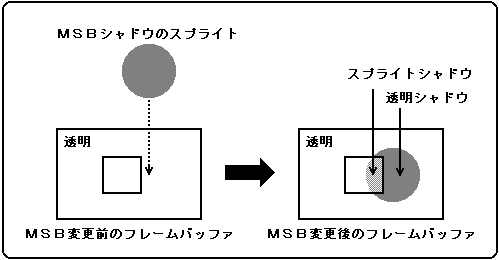
Figure 14.5 MSB shadow sprite data
● Sprite Shadow Bit 15 8 7 0
┌─┬─┬─┬─┬─┬─┬─┬─┬─┬─┬─┬─┬─┬─┬─┬─┐
│ 1 │ × │ × │ × │ × │ × │ × │ × │ × │ × │ × │ × │ × │ × │ × │ × │
└─┴─┴─┴─┴─┴─┴─┴─┴─┴─┴─┴─┴─┴─┴─┴─┘

X can be 0 or 1 as long as the dot color data in the specified sprite type does not meet the conditions for normal shadow.


● Transparent shadow bit 15 8 7 0
┌─┬─┬─┬─┬─┬─┬─┬─┬─┬─┬─┬─┬─┬─┬─┬─┐
│ 1 │ 0 │ 0 │ 0 │ 0 │ 0 │ 0 │ 0 │ 0 │ 0 │ 0 │ 0 │ 0 │ 0 │ 0 │ 0 │
└─┴─┴─┴─┴─┴─┴─┴─┴─┴─┴─┴─┴─┴─┴─┴─┘

● Shadow control register

The shadow control register specifies whether to use the shadow function for scroll screens and back screens. A write-only 16-bit register located at address 1800E2H. After turning on the power or resetting, the value will be cleared to 0, so be sure to set it.

SDSTL 1800E2H
 15
 14
 13
 12
 11
 Ten
 09 09
 08 08
 ---
 ---
 ---
 ---
 ---
 ---
 ---
 TPSDSL

 07 07
 06 06
 05 05
 04
 03 03
 02 02
 01 01
 00
 ---
 ---
 BKSDEN
 R0SDEN
 N3SDEN
 N2SDEN
 N1SDEN
 N0SDEN

Shadow enable bit : Shadow enable bit
(N0SDEN, N1SDEN, N2SDEN, N3SDEN, R0SDEN, BKSDEN)
Specifies whether to use the shadow function for scroll screens and back screens for normal shadow and transparent shadow sprites.

N0SDEN 1800E2H Bit 0 For NBG0 (or for RBG1)
N1SDEN 1800E2H Bit 1 For NBG1 (or for EXBG)
N2SDEN 1800E2H Bit 2 For NBG2
N3SDEN 1800E2H Bit 3 For NBG3
R0SDEN 1800E2H Bit 4 For RBG0
BKSDEN 1800E2H Bit 5 For BACK

Sprites Shadow sprites always use the shadow feature against themselves.

xxSDEN process
0 Do not use the shadow function (do not add a shadow)
1 Use the shadow function (add a shadow)

Transparent shadow select bit: Transparent shadow select bit (TPSDSL) , bit 8
Specifies whether to enable transparent shadow sprites.

TPSDSL process
0 Disable transparent shadow sprites
1 Enable transparent shadow sprites

If you disable transparent shadow sprites, you will not be able to cast shadows on any screen with transparent shadow sprites.


BackForward
HARDWARE ManualVDP2 User's Manual
Copyright SEGA ENTERPRISES, LTD., 1997