SGL User's ManualData transfer
BackForward
Data transfer

2. Sound data


This chapter describes the minimum data format and work that you need to know when passing the sound data created by the sound designer to the software using SGL.

2-1. Data type

All sound data created by Mackintosh is a binary file and is divided into the following files.

BGM, sequence data

1) Tone bank data
Tone data used for songs and sound effects.
Created with the Sega Sound Tool Tone Editor.

Figure 2-1 Example of tone bank data file


You need as many files as you want for your map.
Tell the programmer the order in the map.

2) Sequence data
Song and sound effect data.
Created by the sound simulator of Sega Sound Tool.

Figure 2-2 Example sequence data file


You need as many files as you want for your map.
Tell the programmer the order in the map.

3) DSP program
This is a program for the effect module.
Created with the Sega Sound Tool DSP Linker.

Figure 2-3 DSP program file example


Not required if you do not use the effect.
Tell the programmer the order in the map.

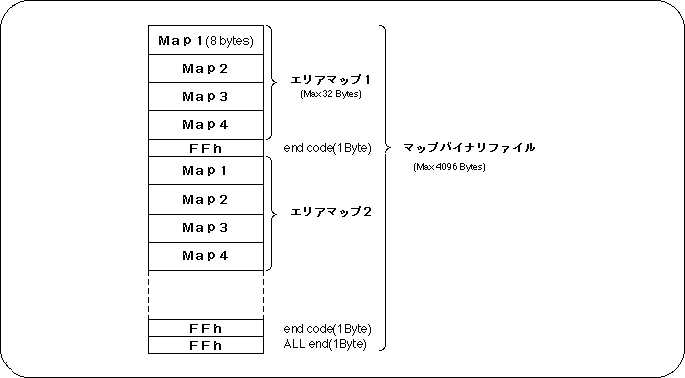
4) Map binary file
Indicate the load address of the files 1) to 3) above and the work area area used for the DSP program in the memory of 68000, which is the sound CPU.
This file is loaded into A000h of 68000 memory.

The map is up to 4096 bytes and can have up to 128 area maps, and one area map can have up to 32 bytes of map information.

Figure 2-4 Structure of map binary file


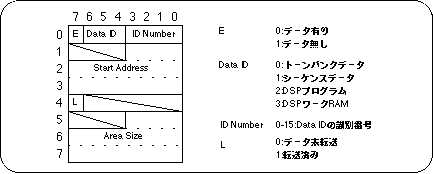
The bit image of each map (Map1-4) is as shown in the figure below.

Figure 2-5 MAP bit image


Figure 2-6 Example map binary file


5) Sound driver
It's better to give the programmer what comes with the Macintosh sound tools to unify the versions.

Figure 2-7 Sound driver


6) Dump data file
This is a dump of the memory from B000h to the last data of the map data with the files 1) to 3) above loaded in the memory of 68000.
(However, if the last data is DSP work RAM, the previous data will be dumped.) There is no need to partially load and use only the necessary banks, and all the map data at once. If you use this dump data file, you do not have to load the files 1) to 3) above one by one. This eliminates the mistake of loading the data and saves the programmer the trouble. The dump data file is created by the sound simulator of Sega Sound Tool.

Figure 2-8 Example dump data file


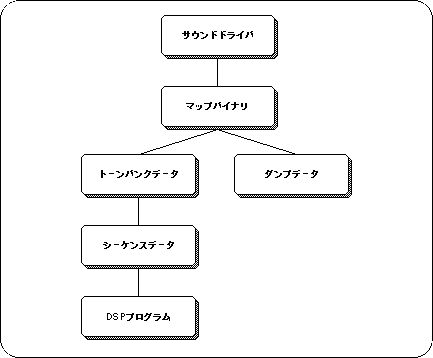
The figure below shows the BGM and sequence files that need to be passed to the programmer.
Pass one of the following files to the programmer:

  1. Sound driver, map binary, dump data (including tone bank data, sequence data, DSP program)
  2. Sound driver, map binary, tone bank data, sequence data, DSP program

Figure 2-9 BGM and sequence files to pass to the programmer


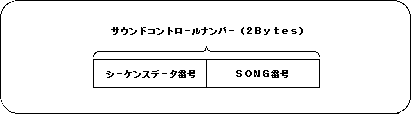
● Contact of sound control number

Programmers use "sound control numbers" to play songs and play sound effects in SGL.
The combination of the sequence data number on the sound simulator and the song number is the "sound control number", so the sound designer tells the programmer what number to use when passing the file and what kind of sound will be produced. Please tell.

Figure 2-10 Sound control number given to the programmer


Data for PCM stream playback

PCM data for use in SGL.

Figure 2-11 PCM data file example

Created by the sound simulator of Sega Sound Tool.

The sound designer should give the programmer the following information when passing the file:

Table 2-1 Information on PCM data files to pass to the programmer

file name sound stereo bit pitch comment
stereo.8 "It's 10 years early" stereo 8 7800 Left and right are offset
mono.16 "Yes" monaural 16 7180
stereo.16 "Au" stereo 16 7F00 Voice flows from right to left

2-2. Data embedding

In order to incorporate the sound data file explained in the previous section into software using SGL, it is necessary to convert each binary data file into array data so that it can be read in C language.

Below is an example script that does this on UNIX.
Here, GNU sed is used.

Script file name [Binary file name] [Array name]> [Output file name]

#! / bin / csh -f echo "char $ 2 [] = {" od -hv $ 1 | cut -s -d "" -f2- | gsed's / \ (.. \) \ (.. \) * / 0x \ 1,0x \ 2, / g' echo "};"

Even in C language, it can be easily done with ANSI functions, so if the development environment is a PC, please create it in C language.

Now you have sound data that can be incorporated into the software. All you have to do is treat it like any other data.


BackForward
SGL User's ManualData transfer
Copyright SEGA ENTERPRISES, LTD., 1997