SGL User's ManualData transfer
BackForward
Data transfer

3. How to burn a CD-ROM


This chapter describes how to burn a user-created game to a CD-ROM.
3-1. Work flow

The CD-ROM is created in a PC DOS English mode environment. Therefore, the file name is limited to 8 characters + 3 characters due to DOS restrictions.

In order to burn a user-created game to a CD-ROM, you need to prepare the IP, program, and data in binary format.

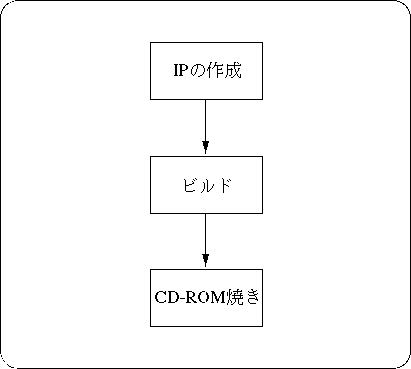
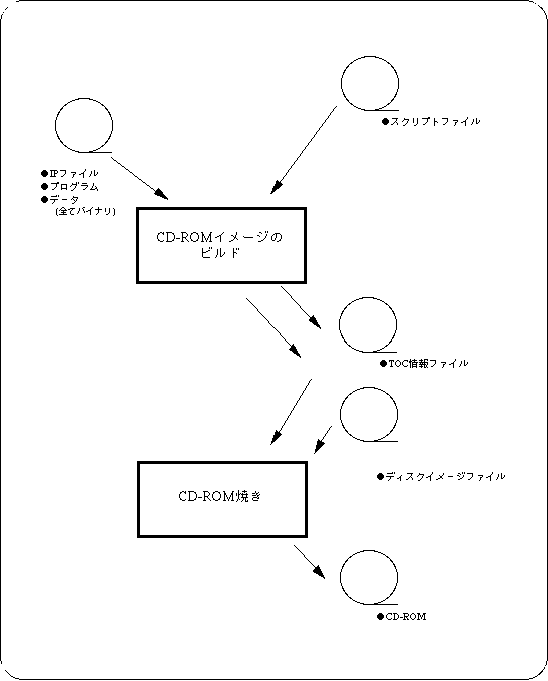
Figure 3-1 shows the basic flow of creating a CD-ROM, and Figure 3-2 shows the files required to create a CD-ROM.

Figure 3-1 Flow of creating a CD-ROM


Figure 3-2 CD-ROM creation flow and files
3-2. Creating an IP

What is IP>

The IP is written to the system area of the CD-ROM disc and is used by the application when using Saturn's boot system. IP is required for all CD-ROM program discs.
(Not required for data discs).
Details of IP can be found in "DISC Format Standard, Boot System" in the Programmer's Guide.

IP configuration

The IP consists of the boot code and the application initial program.
The boot code consists of an ID code such as the game name, a security code supplied by SEGA, and an area code.
The application initial program is placed immediately after the area code and is executed immediately after the area code is executed. After that, the program proceeds under the control of the application.

Table 3-1 IP configuration

structure size remarks
IP
 Boot Code
 System ID
100H
 Game name, product number, version, etc.
 Security Code
D00H
 security code
 Area Code
 20H-100H
 Area code
Aplication Initial
Program
 20H ~ 71E0H
Initial program, file system, etc.

For details on how to create an IP, refer to “ Boot System in the Programmer's Guide”.

3-3. Build

The pre-processing performed to burn all user-prepared binary files (IP, programs, data, etc.) to a CD-ROM is called build. The build creates the TOC information file and disc image file needed to burn the CD-ROM.
Follow the steps below to build.

1) Prepare the file you want to burn on a CD-ROM
Prepare all the files to be written to the CD-ROM on the disk of your PC. The file location is specified in the script file, so it can be anywhere. The file name must be 8 characters and 12 characters (including periods) with 3 extensions. CDDA files must be lined up in Intel format (little endian). For Motorola format (big endian), perform byte swap. (There is "SWAP.EXE" as a byte swap program for DOS.)

2) Securing a work area
Prepare a work area to generate a disc image of the CD-ROM. Must be equal to or greater than the total file capacity. All subsequent file creation and execution should be done in this area. (Move the current directory.)

3) Determining the project name
Since it is used as the body of the MS-DOS file name, it should be no more than 8 characters.
Here, as an example, let's say “sample”.

4) Creating a script file
Create a script file using an appropriate editor while referring to sample program 1 (Listing 3-1). The file name should be the project name with the extension “scr” .
Here, it is “sample.scr” .
The directory for creating the script file should be the directory for executing the "VCDBUILD" command to generate the disk configuration information file and disk image file.

5) Generating a disk configuration information file and a disk image file
Start the preprocessing program “vcdbuild.exe”.
The parameter here is “vcdbuild sample” .
As a result, a disk configuration information file and a disk image file are generated.
Here, “sample.rti” and “sample.dsk” are generated.

6) TOC file generation
Start the TOC file generation program “vcdmktoc.exe”. As a parameter, give the body part (project name) of the RTI file.
Here it is “vcdmktoc samle” .
As a result, a TOC file is generated.
Here, “sample.toc” is generated.

Listing 3-1 Sample program 1 (Create script file “sample.scr”)

Disc sample.dsk
    Session CDROM
            LeadIn MODE1
            EndLeadIn
            SystemArea e: \ ip.bin

            Track MODE1
                  Volume ISO9660 sample.pvd This is the specified part of the volume descriptor set.
                         PrimaryVolume 0: 2: 16 The part in bold is the primary volume EndPrimaryVolume descriptor that is output.
                   End Volume

                   File ASAMPLE.BIN
                        FileSource e: \ mode1 \ asample.bin These 4 lines are for 1 file.
                        EndFileSource
                   EndFile
                   File ASAMPLE1.BIN
                        FileSource e: \ mode1 \ asample1.bin
                        EndFileSource
                   EndFile
                   File ASAMPLE2.BIN
                        FileSource e: \ mode1 \ asample2.bin
                        EndFileSource
                   EndFile

                       ............ If the file continues, add it in the same way.

                   PostGap 150 EndTrack

            Track CDDA These 5 lines make up one CDDA song.
                   Pause 150
                   FileSource e: \ cdda \ samp_cd1.dat
                   EndFileSource
            EndTrack
            Track CDDA
                   Pause 150
                   FileSource e: \ cdda \ samp_cd2.dat
                   EndFileSource
            EndTrack
            Track CDDA
                   Pause 150
                   FileSource e: \ cdda \ samp_cd2.dat
                   EndFileSource
            EndTrack

                       ............ If the song continues, add it in the same way.

            LeadOut CDDA CDDA cannot be specified.
                   Empty 500
            EndLeadOut
    EndSession
EndDisc

3-4. Burning the CD-ROM

Insert the CD-ROM into the CD writer and enter the CD writer command as follows to boot.

“Segacdw.exe”

The parameters to be set are as follows.

    segacdw [-s #] [-i #] [-t] Project name -s… Specify the write speed.
Specify one of 1 (constant speed), 2 (double speed), and 4 (4x speed).
The default is 4x speed.
-i… Specifies the SCSI ID number of the CD writer.
The default is 5.
-t… In test mode, write test is performed.
(It will not be written to the actual CD-ROM.)

For example, parameter setting

“Segacdw -s 2 sample”

It will be. In this case, the project name "sample" is written at double speed to the CD writer with SCSI ID 5.
It is recommended to execute the actual writing once in the test mode, and if there are no errors, follow the procedure of actually writing.
If you want to run test mode, in this example,

segacdw -s 2 -t sample

It will be.


BackForward
SGL User's ManualData transfer
Copyright SEGA ENTERPRISES, LTD., 1997