 ★ SGL User's Manual ★ SOUND STRUCT
▲ Back | Forward ▼
SOUND STRUCT 2. Make a song
This chapter describes the procedure for creating songs using the SEGA Sound Tool and precautions when using the tool.
I won't touch on creating sound effects here, but you can create sound effects in exactly the same way as a song.
There are many terms and it may be confusing at first, but since only the basic editing method is posted, please try various things for the time being.
2-1. Flow of sound production
- The flow of sound production for Sega Saturn using the Sega Sound Tool is as shown in the figure below.
With this flow, it is possible to create sounds without a MIDI sound module. Figure 2-1 Sound production flow
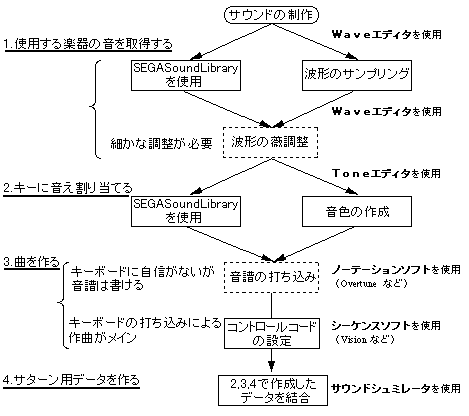
- * SEGA Sound Library is a product of Invision Inc.
- * Overtune is a product of OPCDE SYSTEM INC.
- * Tone Editor is a tool provided by Sega.
- * Wave Editor is a commercially available tool.
About songwriting tools
- Software for creating songs (such as sequencers) is not provided with SEGA Sound Tools. Please use commercially available software.
- Work 1 can also be done with commercially available tools. Choose the one that is easy for you to use.
- When using only notation software, use MIDI events (at a minimum, controller, program) that can be edited.
▲ Back | Forward ▼
★ SGL User's Manual ★ SOUND STRUCT
Copyright SEGA ENTERPRISES, LTD., 1997