- If the start address of DSP WORK RAM is not set in 2000h units, the sound may be significantly distorted (SndSim allows you to specify the start address only in 2000h units).
The size does not have to be in 2000h increments. For example, if the size of Free Area Required is 10040H, it is okay to specify exactly that size (for memory efficiency). - Set the MIXER level of the Output channel not used by the DSP linker to 0, which is the minimum. If it is other than "0" (such as a clipped sound with a DC component added to the original sound), the normal effect may not be output.
- If you change the value violently with the parameter claw on the DPS linker, SCSI communication will not work and the MAC will jump easily, so please stop. This is especially true during MIDI pronunciation.
- Q> = 1.0 is recommended for the PEQ Q of Linker and eLinker. If the Gain is negative or a positive number that is not very large, 1.0 or less is acceptable.
- In order to apply the DSP effect, it is necessary to perform both Effect Change and MIXER Change. If you do not perform MIXER Change, the DSP output level will not rise and the Effect sound will not be played.
- Do not use DSP software modulation. The sound driver does not support it.
- It is possible to apply different effects for the song and SE, switch between various effects in the song, etc., depending on how the data is created. Please, try it.
- The DSP has a higher priority to access the DRAM bus than the 68000. And since the DSP accesses the same DRAM as the 68000, if you use a Delay effect (with a Tap process that reads / writes the delayed RAM many times), the 68000 process will be postponed, and the song will be delayed. In some cases, the command may not be accepted.
In particular, eLinker (extended linker) reverb, early reflection, etc. are highly likely to occur, and care must be taken when using FM with many slots. - About DSP operation of SCSP The DSP of SCSP constantly processes 128-step instructions. In the initial state, NOP (No OPeration) is written for all 128 steps, so the DSP effect is spinning without producing any sound. By patching the effect module with DSPLinker and executing Link in the Process menu, the instruction code (file with the .EXB extension) to be written to the DSP on MACINTOSH is created. Then, the instruction code is written to the DSP by Download of the Process menu, and the DSP starts executing the instruction that operates the patched module (REVERB if REVERB). The operation of this Download corresponds to Effect Change on the actual machine.
- About Ring Buffer in the Option menu The Ring Buffer menu item is used to set the size of the ring buffer (delay memory) used by the algorithm currently being edited. The Ring Buffer is taken within the sound RAM 4Mbit. If the setting value here is too small, an error will occur when executing the link. Also, in order to reduce the size of the sound WORK RAM used even if the link is successful, it is recommended to refer to the displayed contents of the link result information dialog and set it to the minimum necessary.
- Number of steps used by the DSP EFFECT module
| INPUT | 2 |
| OUTPUT | 2 |
| REVERB | 30 |
| EARLY REFLACTION | 54 |
| DELAY | 20 |
| PITCH SHIFT | twenty four |
| CHORUS | twenty four |
| FLANGER | 28 |
| SYMPHONIC | twenty four |
| SURROUND | 38 |
| VOICE CANCEL | 38 |
| AUTO PAN | 6 |
| PHASER | 18 |
| DISTORTION | twenty four |
| FILTER | 8 |
| DYNAMIC FILTER | 20 |
| PARAMETRIC EQ | 8 |
| MIXER2 | Four |
| MIXER3 | Four |
| MIXER4 | 6 |
| MIXER6 | 8 |
| MIXER8 | Ten |
You are free to patch the effect as long as the total of these does not exceed 128 steps.
***reference***
AUTOPAN can be used as a gate. If you don't want to spread it too far to the left or right, try changing the pitch of the VOICE for AUTOPAN or adjust the pan of the MIXER.
- Number of memory accesses and number of voices used in DSP EFFECT module (including expansion)
| REVERB | Ten |
| EARLY REFLACTION | twenty one |
| DELAY | 3 |
| PITCH SHIFT | 3 + 4 voices |
| CHORUS | 3 + 1 voice |
| FLANGER | 4 + 1 voice |
| SYMPHONIC | 3 + 2 voices |
| SURROUND | 15 |
| VOICE CANCEL | 0 |
| AUTO PAN | 0 + 2 voice |
| PHASER | 3 + 1 voice |
| DISTORTION | 0 |
| FILTER | 0 |
| DYNAMIC FILTER | 5 + 1 voice |
| PARAMETRIC EQ | 0 |
| MIXER2 | 0 |
| MIXER3 | 0 |
| MIXER4 | 0 |
| MIXER6 | 0 |
| MIXER8 | 0 |
| REVERB E | 29 |
| EARLY REFLACTION E | 29 |
| DELAY E | Four |
| PITCH SHIFT | 4 + 12 voices |
| CHORUS E | 4 + 3 voices |
| DIST E | 0 |
| Q-SOUND4 | 0 |
| Q-SOUND8 | 0 |
| YAMAHA 3D-SOUND | 0 |
The more memory accesses the DSP EFFECT module has, the more load it puts on the sound driver. Specifically, the sound stops when the song is sluggish or when several SEs sound at the same time.
Specifically, the reverbs of the extended linker are considerably heavy.
In that case, what to do
- Thin out the sequence data of the song.
- If there is an FM (especially chord) tone, stop it.
- Change to an effect with less memory access.
Please do etc. Also, since the sound driver version 2.00, the operation of the driver has become lighter, so there should be fewer cases of bending than 1.xx units.
The meaning of the number of voices used is that the number of pronunciations is reduced by this few minutes from the maximum number of pronunciations of 32.
Also, if you use multiple effects at the same time, these numbers will be added together.
- What to do when using the DSP EFFECT Q-SOUND8 module
If you perform Link and Download as it is, an error message will appear. In that case, follow the procedure below.
- Select the Send Level of the Input module in the window and invert it.
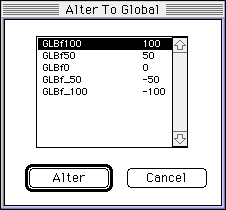
- Select GLBf100 in Alter To Global from the Global Coef menu, highlight it, and press the Alter button.
- The Send Level display changes to GLB f100.
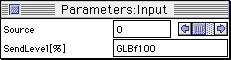
- Do the above for the eight Input modules.
- Q Sound control change Control with $ 50 (80).
Input channels 0 to 7 of the Q sound module are controlled corresponding to MIDI channels 1 to 8, respectively.
Therefore, when controlling the Q sound input channel 2 using MIDI, the control is changed on MIDI channel 3.
The relationship between the parameters set by the control change and the effect is as follows.
Left ~ Center ~ Right 0-15-30
- Yamaha 3D Sound Control Change $ 51, $ 52, $ 53 to set 3 parameters.
Since this module has only one channel, it can be controlled regardless of the MIDI channel.
The relationship between control changes, parameters, and effects is as follows.- distance
- Control change $ 51 (81)
Around me ~ Far away $ 00- $ 7F
- Direction
- Control change $ 52 (82)
Front ~ Right 90 ° ~ Rear ~ Left 90 ° ~ Front $ 00- $ 20- $ 40- $ 60- $ 7F
- height
- Control change $ 53 (83)
Directly above ~ Eye height ~ Directly below ~ Rear eye height ~ Directly above $ 00- $ 20- $ 40-$ 60- $ 7F
For details on the sound control command = 11H (YAMAHA 3D sound) and sound control command = 12H (Q sound), refer to the sound control command and Q sound and YAMAHA 3D sound in "Sound Driver Ver.2.20 Programmer's Guide".
- Noise during EFFECT CHANGE There will be some noise due to the specifications of the chip during EFECT CHANGE, so use host commands such as SOUND INITIAL and MIXER CHANGE to lower the EFECT return level.
The procedure to minimize noise during EFFECT CHANGE in the sound driver version 1.28 or earlier is as follows. Prepare MIXER data (MIXER0) whose EFFECT RETURN level is all 0 and data (MIXER1) whose RETURN level is raised in the tone bank data.
- Sequence off
- All note off
- Mixer change (MIXER 0) EFFECT level down
- Effect change
- Wait about 50mSec
- Mixer change (MIXER1) Raise the level of EFFECT
- Sequence start
This process is not required for Sound Driver Version 1.31 or later. The driver manages the above. Therefore, the rise of the effect sound will be delayed by up to 64 msec at SEQ_START, but it will not be a problem in terms of hearing.
