 ★ Graphic Tools Guide ★ Sega Painter User's Manual /
▲ Back | Forward ▼
Sega Painter User's Manual / 2. Menu
File | Edit | Image | Options | Special | Window
■ Image menu
- You can change the image by changing the size and shape of the image.
- ● Mirror image
- Inverts the image in the selection as if it were reflected in a mirror. The inverted image will be in a floating state.
- Horizontal inversion: Inverts horizontally.
- Vertical inversion: Inverts in the vertical direction.
- ● Rotation
- Rotates the selected image around the center. The rotated image will be in a floating state.
- +90 degrees: Rotate 90 degrees counterclockwise.
- -90 degrees: Rotate 90 degrees clockwise.
- Free rotation: Enter the angle to rotate.
- ● Scale
- Enter the size of the image and zoom in / out based on the center. The scaled image will be in a floating state.
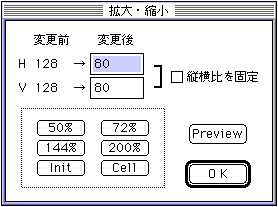
- After change: Enter the changed image size.
- □ Fixed aspect ratio: When you change the horizontal or vertical size, the size of the side that is not entered to maintain the aspect ratio of the original image size is automatically adjusted.
- 50%:
72%:
144%:
200%: Scales at the specified magnification while maintaining the aspect ratio of the image data before operation. - Init: Returns to the image data before starting the scaling operation.
- Cell: Adjust the changed size so that it is a multiple of 8 pixels horizontally.
- Preview: If you manually enter the image size, you can check the scaling result with this button.
- ● Special deformation
- Transforms and maps an image in any 4-point range to any 4-point range specified separately.
Immediately after selecting "Special transformation", the mouse cursor changes to a shape waiting for vertex input.
Click any 4 points of the image before transformation on the document window to set it, and then set any 4 points after transformation in the same way, and the result of transformation will be displayed. - ● Plugin
- Select the function added as a plug-in module.
For the functions and operating procedures, refer to the documents at the time of each module release.
▲ Back | Forward ▼
★ Graphic Tools Guide ★ Sega Painter User's Manual /
Copyright SEGA ENTERPRISES, LTD., 1997