 ★ Graphic Tools Guide ★ Sega Painter User's Manual /
▲ Back | Forward ▼
Sega Painter User's Manual / 2. Menu
File | Edit | Image | Options | Special | Window
■ Special menu
- ● Character sort
- Image data is merged for the same character (image in a certain area) and the number of characters is calculated.
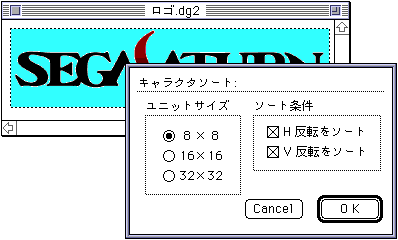
- Unit size: Specify the character size that is the unit of sorting.
- Check condition: Specify when checking inversion as a sort condition.
- A new document window will be automatically created for the sort result, and it will be displayed as shown below.
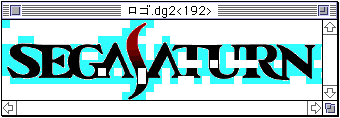
- The title bar of the window shows the number of characters left as a result of sorting.
In addition, the image data displayed is the character to be merged filled with the background color. - ● Palette check
- Checks if the color palette in your character fits within the specified colors.
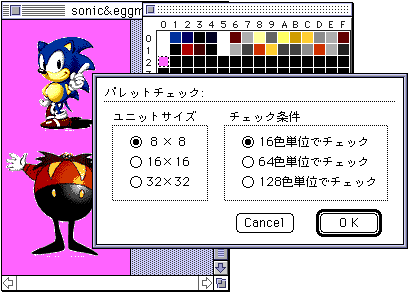
- Unit size: Specify the character size to be the check unit.
- Check condition: Specify the pallet unit to be checked.
- A new document window will be automatically created for the check results and displayed as shown below.
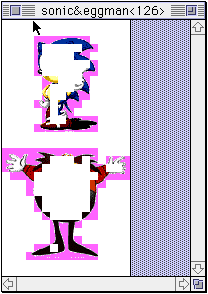
- The number of characters that are not checked is displayed in the title bar of the window.
In addition, the image data will be displayed with the characters within the check rules filled with the background color. - ● Object selection
- Select the object with the specified number.
- ● Setting the object number
- Changes the currently selected object to the specified number.
- ● Animation registration
- Create an animation data table.
See the document " 5. Animation " for more information. - ● Target SW
- It is used to temporarily disconnect or reconnect with a target box that is already connected.
- ● Tone animation
- Performs a color change animation. For details, refer to the document " SegaPainter Animation ".
▲ Back | Forward ▼
★ Graphic Tools Guide ★ Sega Painter User's Manual /
Copyright SEGA ENTERPRISES, LTD., 1997