 ★ Graphic Tools Guide ★ Sega Painter User's Manual /
▲ Back | Forward ▼
Sega Painter User's Manual / 2. Menu
File | Edit | Image | Options | Special | Window
■ Option menu
- Make display settings for the document you are working on and various settings for the editing function.
You can also change the size, color, and palette data of the document here. - ● Document size
- Resize the document you are currently working on.
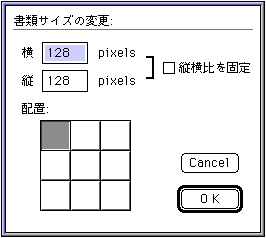
- vertical:
Horizontal: Enter the change value of the document size. - □ Fixed aspect ratio: If you change the horizontal or vertical size, the size of the side that is not entered to maintain the aspect ratio of the original document size is automatically adjusted.
- Placement: Click to specify the position to place the image data on the document after resizing.
- ● Document palette
- Change the reference palette of the document you are currently working on.
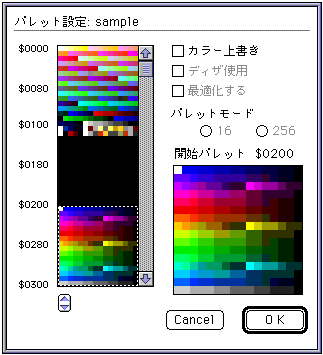
- Click the position you want to change on the color list and specify the reference palette.
- □ Color overwrite: Overwrites the palette data of the document before the change to the specified palette position.
- ● Palette editing
- Edit the palette information of the selected images.
For details, refer to the document " 4. Color Palette ". - ● Color editing
- Edit the color palette information managed by SegaPainter.
For details, refer to the document " 4. Color Palette ". - ● Display magnification
- Specify the magnification when displaying the image.
- x1: Display at the same size.
- x2: Displayed at 2x.
- x4: Displayed at 4x.
- x8: Displayed at 8x.
- ● Grid display
 G
G - Displays a grid of fixed units on the document you are currently working on.
- ● Monitor display position
- Specifies where the currently working document is displayed in the monitor window.
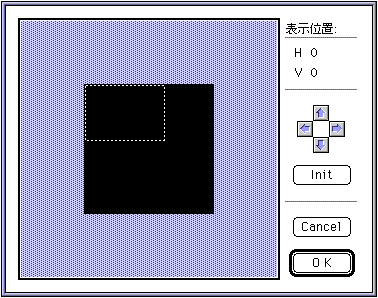
- Specify the display position by moving the displayed monitor frame by dragging.
- Cursor button: Moves the monitor frame vertically and horizontally each time the button is clicked.
- Init: Initializes the display position to the (0,0) position of the image data.
- ● Various settings
- Set each tool on the tool palette and each function of some menus.
- ◆ Pencil tool
- Set the shape and size of the pencil tool.
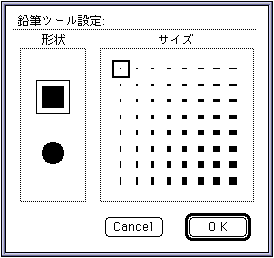
- Shape: Select the shape of the pencil.
- Size: Select the size of the pencil.
- ◆ Brush tool
- Set the shape and size of the brush tool.
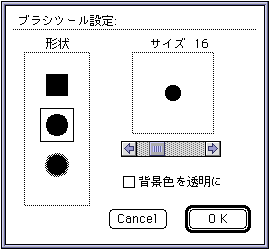
- Shape: Select the shape of the brush.
- Size: Determine the size of the brush with the scroll bar.
- Make the background color transparent: Draw with the background color transparent.
- ◆ Eraser tool
- Set the shape and size of the eraser tool.
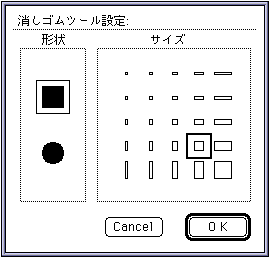
- Shape: Select the shape of the eraser.
- Size: Select the size of the eraser.
- ◆ Line tool
- Set the thickness of the line tool and the drawing method.
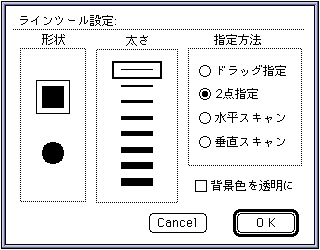
- Shape: Select the shape of the line.
- Thickness: Select the thickness of the line.
- Specification method: Select the drawing specification method.
- Drag specification: Draws a straight line connecting the start and end points of the drag.
- Specify 2 points: Draws a straight line connecting the two clicked points.
- Horizontal scan: Draws a horizontal line in the continuous area of the same palette code as the clicked point.
- Vertical scan: Draws a vertical line in the continuous area of the same palette code as the clicked point.
- Make the background color transparent: Draw with the background color transparent.
- ◆ Airbrush tool
- Set the thickness and density of the airbrush tool.
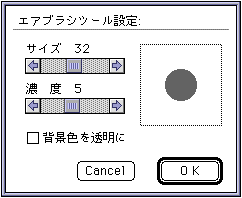
- Size: Specify the size of the airbrush with the scroll bar.
- Density: Specify the density of the airbrush with the scroll bar.
- Make the background color transparent: Draw with the background color transparent.
- ◆ Rectangle tool
- Set the thickness and drawing method of the Rectangle tool and Rectangle fill tool.
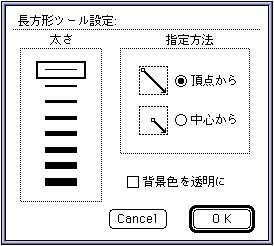
- Thickness: Specify the thickness of the rectangular drawing. This setting does not affect the Rectangle Fill tool.
- Specification method: Select the drawing specification method.
- From vertices: Draws a rectangle with the start and end points of the drag as vertices.
- From center: Draws a rectangle centered on the start point of the drag and with the end point as the apex.
- Make the background color transparent: Draw with the background color transparent.
- ◆ Rounded rectangle tool
- Set the thickness and drawing method of the Rounded Rectangle Tool and the Rounded Rectangle Fill Tool.
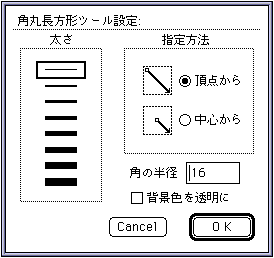
- Thickness: Specify the thickness of the rounded rectangle drawing. This setting does not affect the Rounded Rectangle Fill tool.
- Specification method: Select the drawing specification method.
- From Vertex: Draws a rounded rectangle inscribed in a rectangle with the start and end points of the drag as vertices.
- From center: Draws a rounded rectangle centered on the start point of the drag and inscribed in the rectangle with the end point as the apex.
- Radius of corners: Specifies the radius of rounded corners.
- Make the background color transparent: Draw with the background color transparent.
- ◆ Oval tool
- Set the thickness and drawing method of the ellipse tool and ellipse fill tool.
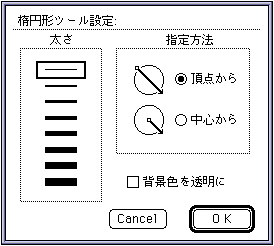
- Thickness: Specify the thickness of the ellipse drawing. This setting has no effect on the Ellipse Fill tool.
- Specification method: Select the drawing specification method.
- From Vertex: Draws an ellipse inscribed in a rectangle with the start and end points of the drag as vertices.
- From center: Draws an ellipse inscribed in a rectangle centered on the start point of the drag and with the end point as the apex.
- Make the background color transparent: Draw with the background color transparent.
- ◆ Selection tool settings
- Use this when you want to apply the selection tool to a certain unit.
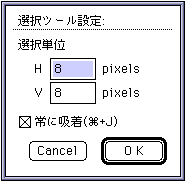
- Selection unit: Specify the unit to be adsorbed.
- Always adsorb: It always works by adsorbing to the selected unit.
" A shortcut of "+ J" is assigned.
- ◆ Grid setting
- Set the grid unit and color.
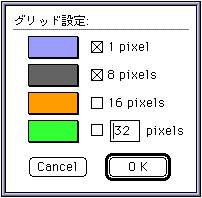
- 1 pixel:
- 8 pixel:
- 16 pixel: Display the grid of each checked unit.
- ?? pixel: Displays the grid of the entered units.
- To change the grid color of each unit, click the color box to call the color picker.
▲ Back | Forward ▼
★ Graphic Tools Guide ★ Sega Painter User's Manual /
Copyright SEGA ENTERPRISES, LTD., 1997