 ★ Graphic Tools Guide ★ Sega Painter User's Manual /
▲ Back | Forward ▼
Sega Painter User's Manual 2. Menu
File | Edit | Image | Options | Special | Window
■ File menu
- It manages files such as input / output of documents.
You can also print and exit the application here. - ● New
- Displays a new dialog and opens a new document.
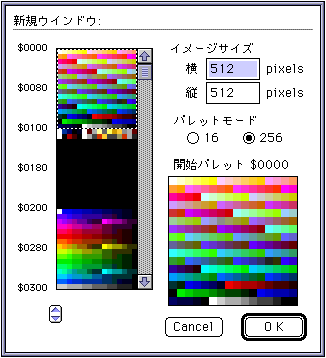
- Color list: Specify the palette to be assigned to the new document.
- Image size: Enter the size.
- Palette mode: Select the palette mode from 16 colors or 256 colors.
- ● Open
- Open an existing document file.
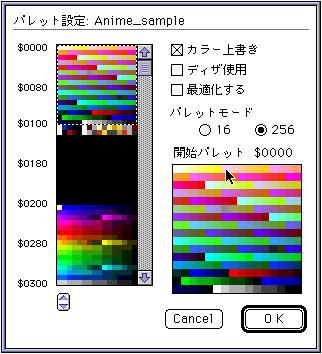
- Color list: Specify the palette to be assigned to the document.
- Color Overwrite: Overwrites the color palette used in the document with the palette specified in the list.
- Use dither: When dithering, apply dither.
- Optimize: This is a valid option when you do not want to overwrite the palette.
Optimizes the image of the document and opens the file using the palette specified in the list. - Palette mode: Select the palette mode from 16 colors or 256 colors.
If the mode of the specified file is different from the mode specified here, color compression (color removal) is performed.
* For documents saved in SegaPainter, the previously edited palette and palette mode are automatically assigned.
- ● Close
- Close the document you are currently working on.
- ● Save
- Save the document you are currently working on in a file with the same name.
- ● Save as
- Rename the document you are currently working on and save it in a separate file.
- ● Export
- It is automatically saved for each object set in the current window.
- ● Paper settings
- Set various conditions for printing.
- ● Print
- Print the document.
- ● End
- Exit "Sega Painter".
▲ Back | Forward ▼
★ Graphic Tools Guide ★ Sega Painter User's Manual /
Copyright SEGA ENTERPRISES, LTD., 1997