HARDWARE ManualSMPC User's Manual
■ | Advance
SMPC User's Manual

Chapter 1 Overview


■ 1.1 System configuration

SMPC manages the reset control of the Saturn system when the power is turned on and the NMI request to the master SH-2 when the reset button is pressed. In addition, commands from SH-2 are used to turn on / off each LSI, set and acquire calendar clocks, and collect data from peripherals. In addition, the clock change command switches the horizontal resolution to 320 dots or 352 dots.

Figure 1.1 SMPC system configuration
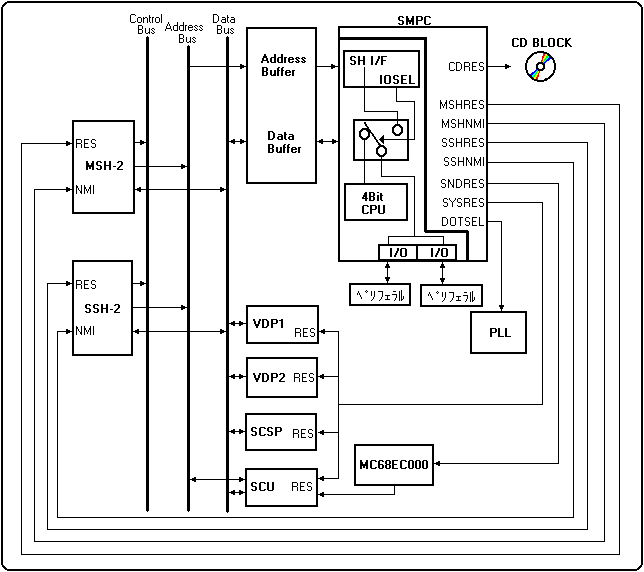
The SMPC has two sets of 7-bit parallel I / O ports.
Access to the I / O port is controlled by the firmware inside the SMPC, and there are two access methods: SMPC control mode, which outputs the collected data to the SMPC output register (OREG), and SH-2 direct mode, which can be accessed directly from SH-2. You can select. For details on SMPC control mode and SH-2 direct mode, refer to Chapter 3, " ◆ SMPC control mode " and " ◆ SH-2 direct mode, " respectively.
When the power is turned on, each unit inside Saturn will be initialized to the following state.

<Initial state when power is turned on>

Sound CPU OFF state
The sound CPU has a reset. Start from the power-on vector with the SNDON command.

VDP1, VDP2, SCU, SCSP ON status
It is accessible from SH-2.

Slave SH OFF state
The slave SH-2 has a reset. Start from the power-on vector with the SSHON command.

DOT SEL OFF state
The PLL oscillation frequency is 320 mode (NTSC: 26.8741MHz, PAL: 26.6875MHz), and VDP1, VDP2, and SH-2 are operating at this frequency. It operates in 352 mode (NTSC: 28.6364MHz, PAL: 28.4375MHz) with the CKCHG352 command.

CD block ON state
It is accessible from SH-2.

● Function

SMPC has three main functions: RTC (Real Time Clock), SM (System Management), and PC (Peripheral Control). The main functions of SMPC are shown below.

<Main functions of SMPC>

RTC (Real Time Clock)
・ Time setting and acquisition from SH-2
・ Automatically update date, day of the week, hour, minute and second
(Battery backup is possible when main power is off)

SM (System Management)
・ Sound CPU ON / OFF
・ ON / OFF of master SH-2 and slave SH-2
・ System reset control
・ Clock switching (PLL control)
・ Power ON reset
・ Request NMI from master S-2 by pressing the front panel button

PC (Peripheral Control)
・ Supports peripherals with Saturn peripheral interface specifications
-Automatically collects peripheral data for control pads, mice, etc.
・ Supports mega drive peripherals
(3 buttons, 6 buttons, Sega tap, etc. However, a conversion adapter is required)

● Input peripheral

◆ Sega Saturn standard pad
The standard digital pad for Sega Saturn is equipped with up, down, left, right, A, B, C, X, Y, Z, L, R, and start buttons.

◆ Multi controller
The multi-controller is equipped with analog keys and analog LR buttons while maintaining compatibility with the Sega Saturn standard pad.
Reference: STN-43 "Multi-Controller User's Manual Ver1.00"

◆ Mission stick
Reference: STN-34 "Analog Mission Stick Manual"

◆ Racing controller
Reference: STN-38 "Racing Controller Manual"

◆ Shuttle mouse
Reference: STN-44 "Supplementary explanation of shuttle mouse"

◆ Sega Saturn keyboard
Reference: STN-45 "Supplementary explanation of Saturn keyboard"

◆ Virtual Gun
Reference: STN-41 "Virtual Gun User's Manual Ver1.00"


■ | Advance
HARDWARE ManualSMPC User's Manual
Copyright SEGA ENTERPRISES, LTD., 1997